Runs directly on Odoo ERP
The calmest way to be an employee
Everything your people need, in one app live on your Odoo data
Leave balances, salary letters, requests, approvals and attendance — all reading and writing to the same Odoo database. No middleware sync, no double entry, no two numbers that disagree.
Available on Google Play and the App Store
The self-service portal your people actually open
ESS HUB is a mobile self-service app built directly on Odoo. Instead of emailing HR for every request, an employee answers their own question and completes their own transaction from their phone — and it lands in Odoo instantly, because it never left it.
For employees
Their leave balance, salary letter, payslip and the status of every request they have filed — without waiting on a reply or walking to a desk.
For line managers
Everything waiting on their decision in one inbox, with the full context of a request before they approve or reject it, plus a view of what their team is behind on.
For HR teams
Fewer routine tickets arriving, while policies, permissions and reporting lines stay exactly where they already live — in Odoo, with no second system to keep in step.
Every service an employee needs, every decision a manager owes
Grouped by who uses them. Pick the group that applies to you.
Self-serve, from a phone
The handful of services that make up most of an employee’s traffic to HR, handed to them directly with a clear status at every step.
Leave balance and requests
Remaining days exactly as Odoo calculates them, with the request form on the same screen — no paper, no separate portal.
Salary definition letter
An employee requests a salary certificate and receives it in the app, instead of emailing HR and waiting for a reply.
Payslips
Employees review their pay details and entitlements as held in your Odoo payroll module.
Request tracking
Every request carries a reference number and a stated status — under review, approved, or done — so nobody has to ask where theirs got to.
Expenses and custody
File an expense or custody request and attach the receipt photo from the phone, straight into the Odoo approval chain.
Faster decisions, with better context
A manager should not need Odoo open on a laptop to approve a day of leave.
Approvals inbox
Everything awaiting a decision in one triage list, with a live count on the home screen so nothing sits unnoticed.
Full context before deciding
Requester, type, dates and attachments all shown on the decision screen — approvals are never made blind.
Team activity
Overdue, today and planned split into clear buckets, so it is obvious where things are slipping.
Approval routing that follows your org
The approval chain is the one already defined in your Odoo — not rebuilt inside the app, and never out of step with it.
Check in and out without a biometric terminal
One button in the middle of the navigation bar records attendance, with a location check.
Location-verified check-in
Attendance is recorded against the employee’s position relative to your registered sites, rather than a fingerprint reader at every door.
Always within reach
The check-in button is present on every screen, so nobody hunts through menus to clock in.
Straight into Odoo
Each check-in writes to the Odoo attendance module as it happens and feeds payroll with no manual transfer.
Built for Arabic, wired to your system
The technical and design decisions that make this fit an Arabic-speaking workplace running Odoo.
Native Odoo integration
The app is a front end on your database, not a separate system syncing with it. What you see in the app is what is in Odoo.
Arabic-first, fully RTL
The interface was designed in Arabic first, with a complete right-to-left layout covering icons and direction — not a mirrored translation.
Light and dark themes
Two complete themes that swap from one switch and follow the device setting by default.
Data stays in your system
We do not keep a parallel database of your employees; their records remain in your organisation’s Odoo.
Not a system that syncs with Odoo — a surface that runs on it
The distinction matters: the app reads and writes to the Odoo modules you already run. No intermediate database, no sync job to lag or fail, and no figure that differs between two screens.
Modules it connects to
- Employees
- Time Off
- Attendance
- Payroll
- Approvals
- Contracts
Why the difference matters
A separate self-service platform
- Employee data lives in two systems that must be kept identical
- Sync can lag or break, and the numbers drift apart
- A second licence, plus an integration that needs ongoing upkeep
ESS HUB on Odoo
- One source of truth, and it is Odoo itself
- What the app shows is what the system holds, with nothing in between
- Your policies, permissions and hierarchy exactly as defined in Odoo
From connection to first approved request
Four steps, starting from the Odoo system you already own.
- 1
Connect the app to Odoo
We connect ESS HUB to your organisation’s Odoo instance and align permissions with what is defined there.
- 2
Enable the services you want
Choose what your people can do — leave, salary letters, expenses, attendance and the rest.
- 3
Roll the app out
Employees install the app on their device and sign in with their organisation account.
- 4
Requests follow their route
An employee files a request, it lands in their manager’s approvals inbox, and the decision is recorded in Odoo directly.
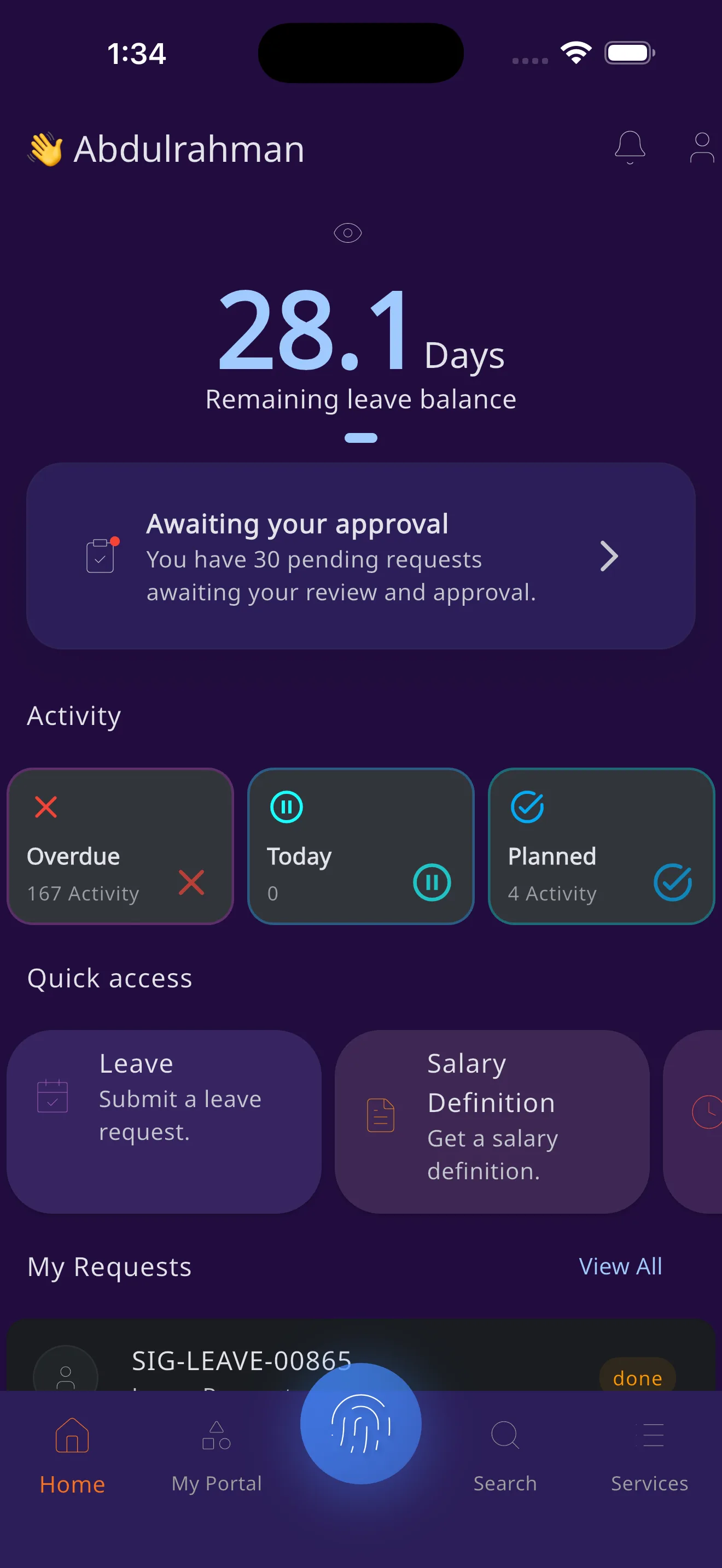
The home screen, explained
This is an actual screenshot from the app. Pick any element to see what it does for the employee.
Home screen elements
App screens
These are the screens defined in the ESS HUB design system. The screenshot above is the home screen; the rest are described here, as no published captures exist for them yet.
Home
Leave balance, pending approvals, activity and quick access.
Approvals triage
The list of requests awaiting a manager’s decision, ordered for fast triage.
Approval detail
The full context of a request with its attachments, and the approve or reject decision.
Attendance
Location-verified check-in and check-out, with a record of entries.
Requests
All of an employee’s requests with their reference numbers and current status.
ESS HUB is on your official app store
Choose the store for your device to install ESS HUB securely and receive future updates automatically.
Installation and updates are handled securely by your device’s official store.
Questions before you install
What IT teams and employees usually ask.
Does the app require Odoo?
Yes. ESS HUB is a self-service surface that runs on Odoo and connects to your organisation’s instance. It does not work as a standalone HR system.
Where can I install ESS HUB?
Install the Android version from Google Play, or the iPhone and iPad version from the App Store.
How will I receive updates?
Updates are delivered through Google Play or the App Store according to your device and store settings.
Where is employee data stored?
In your organisation’s Odoo instance. The app is a surface that reads and writes to it, and does not build a parallel database of your employee records.
Which languages are supported?
Arabic and English, with a complete right-to-left layout in the Arabic interface.